Rook
A small, low-power LoRa board for off-grid mesh radio and remote sensing.
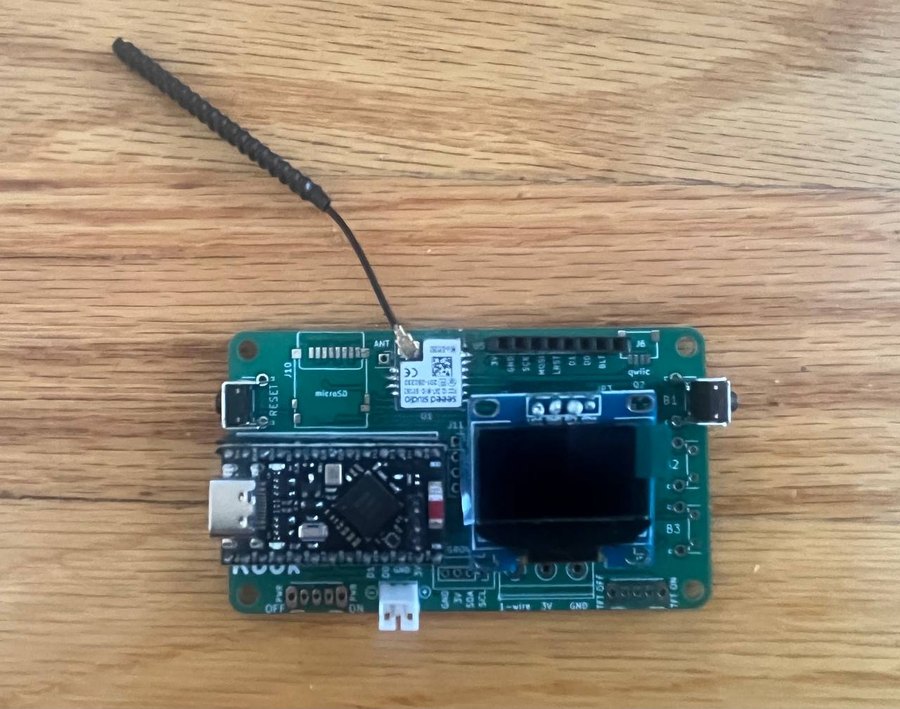
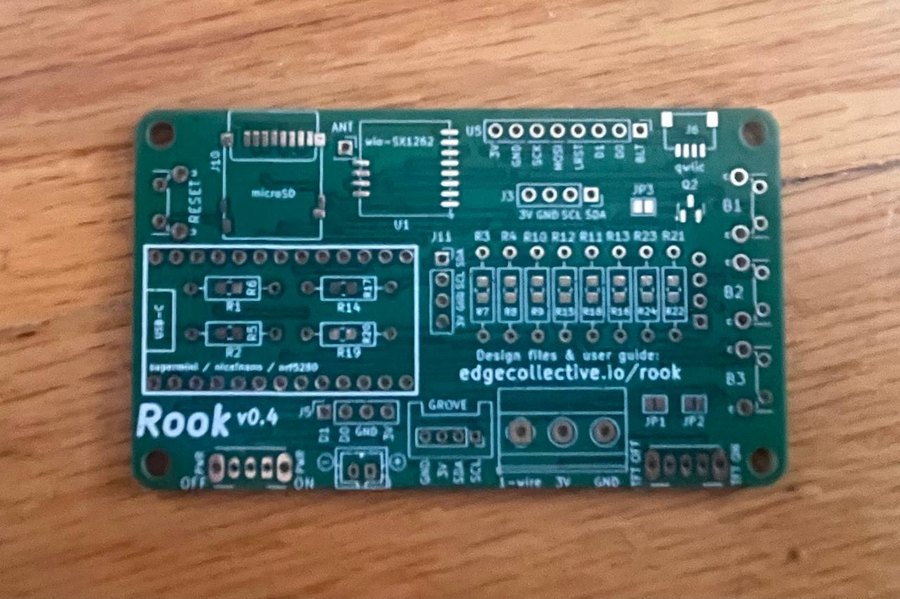
Rook is an open hardware radio board from Edge Collective. It is built for nodes that sit outdoors on a battery and keep working: mesh repeaters, remote sensors, and anything else that needs to send data a long way without cell service or WiFi.
It runs MeshCore firmware, and it is the board inside the Mesh Radio Water Level Kit.
What's on the board
The current revision is Rook v4. The silkscreen reads v0.4.
| Size | 79 × 46 mm |
|---|---|
| Microcontroller | nRF52840, on a plug-in Pro Micro–format module (SuperMini / nice!nano compatible), with USB-C and Bluetooth LE |
| Radio | Seeed Wio-SX1262 LoRa module, up to 22 dBm, with a u.FL antenna connector |
| Frequency | Assembled boards ship set up for 915 MHz (US) |
| Display | SSD1306 OLED over I²C |
| Storage | microSD card slot |
| Power | 2-pin JST battery connector, on/off switch, and battery voltage sensing |
| Buttons | Reset, plus three user-button positions (B1–B3) |
Connectors
| Label | Connector | Pins |
|---|---|---|
| J6 | Qwiic | I²C |
| GROVE | Grove | GND, 3V, SDA, SCL |
| J3 | 4-pin header | 3V, GND, SCL, SDA |
| — | 3-position screw terminal | 1-wire, 3V, GND |
| J5 | 4-pin header | D1, D0, GND, 3V |
| U5 | 8-pin header for an ST7789 TFT display (SPI), with a backlight on/off jumper | 3V, GND, SCK, MOSI, LRST, D1, D0, BLT |
The MeshCore build for Rook supports AHT20 (AHTx0), BME280 and BMP280 environmental sensors on the I²C bus, and a serial GPS.
Firmware
Pre-built MeshCore firmware for Rook. Download the .uf2 file that fits how you want to use the board.
Repeater
A standalone node that relays mesh traffic and extends your network's range. Leave it somewhere high, on a battery or solar.
Download repeaterRook_repeater_apr14_2026.uf2 · MeshCore v1.13.0
Companion radio (Bluetooth)
Pair the board with the MeshCore app on your phone over Bluetooth, and send and receive messages on the mesh.
Download companionrook_companion_radio_ble_v0.4.uf2 · MeshCore v1.15.0
An older companion build, on MeshCore v1.13.0, is also available:
rook_comparion_radio_ble_april_7.uf2.
Assembled boards from the shop come with MeshCore already installed. You only need these files to switch roles or reflash a board.
To build the firmware yourself, the Rook board definition is in variants/rook of
edgecollective/MeshCore-rook.
Flashing firmware
Rook uses the standard nRF52840 UF2 bootloader, so you don't need any special tools.
- Download the
.uf2file you want from the firmware section. - Plug the board into your computer with a USB-C cable, into the port on the microcontroller module.
- Double-tap the RESET button. The board shows up on your computer as a USB drive.
- Drag the
.uf2file onto that drive. - The drive disappears when the copy finishes, and the board restarts with the new firmware.
If no drive appears, try a different USB cable, because some cables only carry power. Then double-tap RESET a little faster.
Hardware design files
Rook is designed in KiCad. The files for the current board, v4, are in
hardware/v0.4/rook/ on GitHub.
Gerbers
Copper, mask, silkscreen and drill files, zipped and ready to upload to a PCB fab.
Download gerbers (.zip)| File | What it is |
|---|---|
rook.kicad_pro | KiCad project. Open this, and the schematic (rook.kicad_sch) and layout (rook.kicad_pcb) come with it. |
footprints/, symbols/ | Custom footprints and symbols the project uses |
plate/ | A mounting plate for the board (OpenSCAD source and SVG) |
To work on the design, clone the repo and open hardware/v0.4/rook/rook.kicad_pro in KiCad.
Earlier revisions are kept for reference in
v0.1,
v0.2 and
v0.3.
Building your own
The bare PCB is for people who solder, want to change the design, or need a handful of boards cheaply. You'll need to source the microcontroller module, the Wio-SX1262 radio, the OLED, and the passive parts yourself, then flash the firmware as described above.
Questions, fixes and improvements are welcome. Please open an issue or a pull request.